

Overview
A guardrail is a named, configured instance of a plugin. Guardrails run inside every workflow that references them, in one of three phases:- prompt: after routing, before the request reaches the provider
- response: on the complete response, before it reaches the client
- stream: on each streamed event (or on the buffered stream, depending on the plugin)
/v1/responses, a stream-phase guardrail may drop, merge, or split events,
so GoModel renumbers what it delivers: sequence_number still runs from 0
without gaps, up to the terminal response.completed (or response.incomplete
/ response.failed on a cut stream).
Guardrails work across all text-based endpoints:
/v1/chat/completions/v1/responses/v1/messages
Guardrails for images, TTS, STT, and video models are planned as a separate
system and are not covered here.
Quick Start
Add aguardrails section to your config/config.yaml:
Manage from the Dashboard
Guardrail definitions can also be created and edited from the admin dashboard instead ofconfig.yaml — useful for iterating on rules without a
redeploy, or for operators who don’t manage this repo’s config directly.
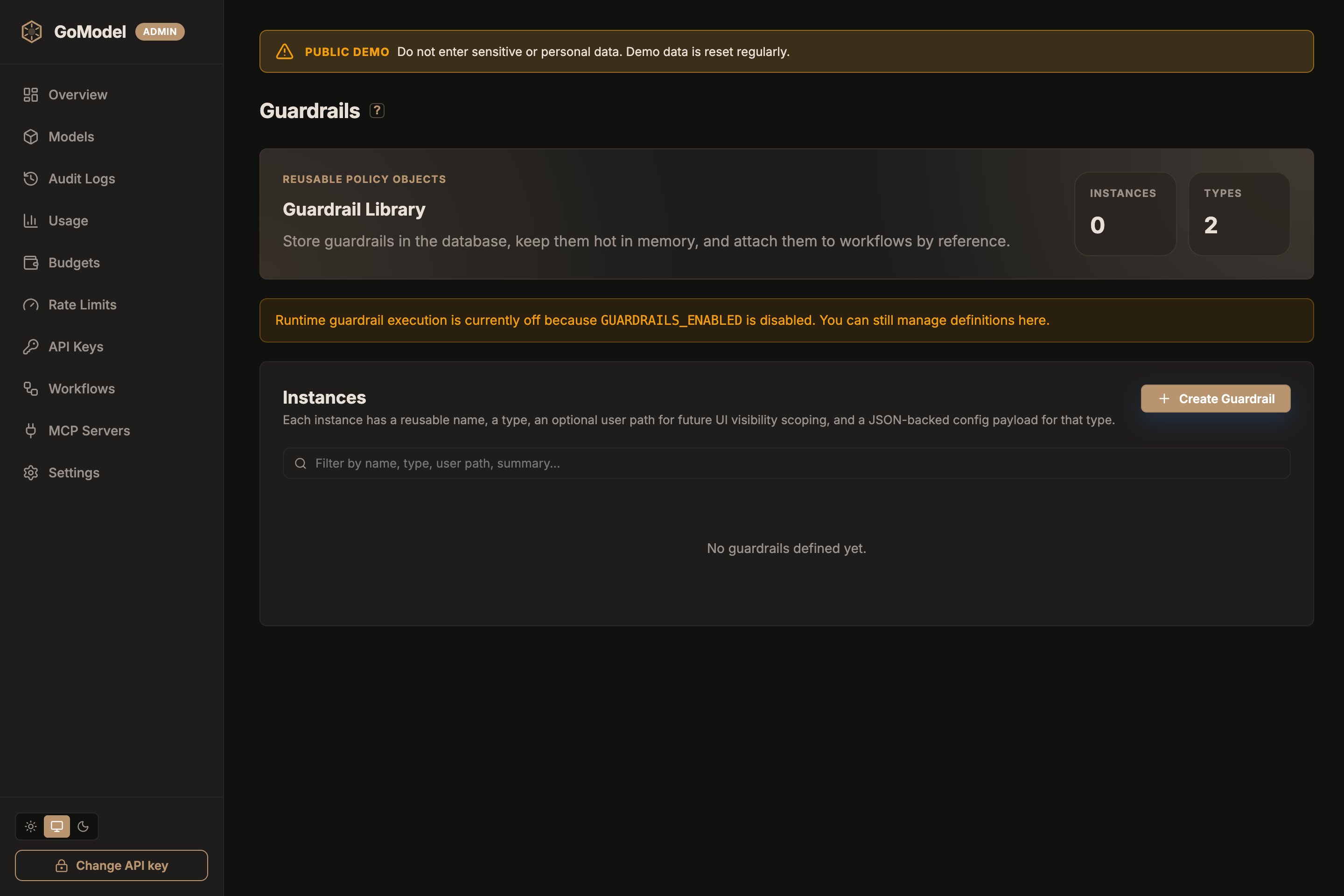
user_path, and fill in the form
the plugin declares. The Advanced section holds the failure mode and
timeout. config.yaml entries are seeded into the same store at startup and
stay in sync with it, so dashboard-created and config-declared guardrails
appear side by side. The Plugins list at the bottom of the page shows
every loaded plugin type, its hooks, source, and health. Not every plugin is a guardrail:
a plugin declares Guardrail: true in its manifest when its instances apply
a policy to prompts, responses, or streams, and the dashboard marks those,
and the instances built from them, with a shield. A routing strategy such as
cheapest_healthy is listed on the same page but is not a guardrail.
Runtime guardrail execution still depends on
GUARDRAILS_ENABLED. With it
off, the page still lets you manage definitions — they just don’t run on
live traffic yet.How It Works
- The request is mapped to a unified
Prompt(system, user, assistant, and tool messages with stable IDs) - The prompt chain runs: each guardrail edits the prompt, or decides to block, respond, or warn
- Edits are applied back to the original request, which continues to the provider
- The response chain runs on the complete response (or the stream chain on the stream) before anything reaches the client
Exchange. The same guardrail works
identically for /chat/completions, /responses, and /messages.
Execution Order
Each guardrail has anorder value (the workflow step) that controls when it
runs within its phase:
- Same order → run in parallel (concurrently)
- Different order → run sequentially (ascending)
system_prompt, llm_based_altering,
string_replace, presidio) cannot share an order with another editing guardrail; only
one editor per order, and any number of non-editing checks (llm_judge,
header_edit) next to it. When several guardrails at one order decide
differently, the most severe decision wins: block > respond > warn >
allow.
Guardrails, rate limits, and budgets
A prompt-phase guardrail can end the request itself (block) or answer it
(respond), and an llm_judge step spends real provider money
deciding that. So on a request that runs a prompt chain, rate limits and
budgets are enforced before the chain:
- A request over its rate limit or budget is refused with
429without the chain running, so a judge call is never made for a request the gateway will not serve. - A request the chain blocks or answers still consumes its rate-limit token and still had to pass the budget check — the decision is not a free request.
- Because enforcement moves ahead of the cache lookup for these requests, a response-cache hit on a request that runs a prompt chain counts too. Without a prompt chain, cache hits stay free (see Rate limits and Budgets).
<user_path>/guardrails/<instance>, so its cost is attributed to the caller
that triggered it.
Configuration
Full Structure
system_prompt and llm_based_altering also accept their settings in a typed
block named after the type (system_prompt: / llm_based_altering:), as in
the Quick Start. The typed block and config: are equivalent; use config:
for every other type. Line-oriented keys such as string_replace.rules and
the header_edit lists accept either a block scalar (|) or a YAML list of
strings, joined by newlines.
Environment Variable
You can toggle guardrails without editing the config file:PLUGINS_ENABLED, off by default). With both off,
the guardrail endpoints and the dashboard page are unavailable.
Rule Fields
Guardrail Types
Six types ship with GoModel. Each is a built-in plugin; the tables list its config keys as they appear underconfig: and on the dashboard form.
system_prompt
Adds, replaces, or decorates the system prompt on every request.
Phases: prompt. Edits content: yes.
Settings
Modes
- inject
- override
- decorator
Adds a system message only if none exists. Existing system prompts are left untouched.Behavior:
- Request has no system prompt → adds one
- Request already has a system prompt → no change
llm_based_altering
Rewrites the text of selected message roles by calling an auxiliary model.
In the prompt phase it rewrites the request; in the response phase it
rewrites the assistant’s reply (when roles includes assistant). This is
useful for PII anonymization and other content-preserving rewrites.
The default prompt is derived from LiteLLM’s data_anonymization guardrail,
so a minimal config acts as an anonymizing preprocessor.
Phases: prompt, response. Edits content: yes.
Settings
Rewrites run through the normal translated request path in-process, so
workflow selection, failover, usage, audit, and cache behavior still apply.
The internal request uses:
- path:
/v1/chat/completions - user path:
{guardrail.user_path or caller user path}/guardrails/{guardrail name} - request origin:
plugin
fail_mode decides: closed rejects the
request, open continues with the original text.
Example
string_replace
Replaces, flags, or blocks text that matches a list of literal or regular
expression rules. Works on prompts, responses, and streams. Rules match
within one text part (a content part or a tool-result part) in every mode;
text split across two parts is not matched.
Phases: prompt, response, stream. Edits content: yes.
Settings
In the stream phase,
replace and warn transform events in flight with the
configured lookbehind. block and respond buffer the whole stream so
nothing leaks before the decision, at the cost of delaying the first token
until the response is complete.
Example
header_edit
Sets, adds, and removes HTTP headers on the request, the client response, and
the upstream provider call. It never edits content, so it can share an order
with an editing guardrail.
Phases: prompt, response. Edits content: no.
Settings
Every key is a list of lines. Set and add lines look likeName: value;
remove lines are a bare Name. Blank lines and # comments are ignored.
Credential headers (
Authorization, X-Api-Key, Cookie, …) can never be
edited, and names containing secret or token cannot be set.
Example
llm_judge
Asks a judge model whether the prompt (or the response) violates a policy and
blocks, answers, or flags it based on the verdict. The judge must reply with
one JSON object {"verdict":"allow"|"block","reason":"..."}; the default
instructions do that and tell the model to ignore instructions inside the
content.
Phases: prompt, response, stream (buffered). Edits content: no.
Settings
Identical text is judged once per request, so an instance that runs in both
the prompt and the response phase does not double-charge for the same
content. In the stream phase the whole stream is buffered and judged as a
complete response.
Example
presidio
Detects personal data with a Presidio
analyzer and anonymizes, flags, or blocks it. Only the analyzer service is
needed; GoModel rewrites the text itself, so it can put the original values
back into the response.
Settings
Every text part is analyzed on its own (one analyzer call each, up to eight
in flight), so the analyzer never sees the whole conversation as one text and
the analyzer’s own limits apply per part. The audit detail records entity
types and counts, never the values, and errors from the analyzer never carry
the text it was given. The analyzer receives the text in clear, so run it as
a sidecar on the same host or reach it over
https:// or a private network.
In the stream phase, anonymize and warn transform events in flight in
chunks of stream_chunk characters with stream_lookbehind of overlap; a
block_entities type found mid-stream cuts the stream before that chunk
reaches the client. block and respond buffer the whole stream so nothing
leaks before the decision.
Restoring values
Withrestore: true the prompt phase replaces values with numbered
placeholders and remembers them for the request; the response or stream
phase puts the values back where the model repeats a placeholder, in text
and in tool-call arguments, so the client sees its own data while the
provider never does. Set restore on the instances in both phases: the
prompt-phase instance records the values, the response-phase instance
restores them. Only values from user messages, earlier assistant turns, and
tool results are put back; a value from a system or developer message stays
a placeholder, so a user cannot make the model reveal it. A value the model
produced on its own is still anonymized on the way out. Such responses are
kept out of the response cache. Placeholder-shaped text
already in the conversation, such as a <PERSON_2> an earlier reply carried
back, is left as it is and its number is never reused for a new value.
Streamed tool-call arguments are restored in flight as well, each call’s
arguments as a window of its own under stream_lookbehind, including
placeholders whose angle brackets the provider escaped (Gemini returns
\u003cPERSON_1\u003e).
Example
Examples
Single Safety Guardrail
The simplest setup — add a safety prefix to every request:Checks in Parallel with an Editor
A non-editing check shares order0 with the system prompt editor and runs
concurrently with it:
Sequential Pipeline
Guardrails with different orders run one after another. Later groups see the output of earlier ones:Response Phase: Redact Secrets on the Way Out
Runs on the complete response before it reaches the client. Setfail_mode: open if you prefer an unredacted answer over a 500 when the
guardrail itself fails.
Stream Phase: Redact In Flight and Judge the Whole Answer
The same instance can be referenced in several phases.mask-keys transforms
streamed chunks in flight (64 characters of lookbehind, so a key split across
two chunks is still caught). answer-judge needs the whole answer, so it
buffers the stream and the client receives it once the verdict is in.
How It Works With Different Endpoints
Guardrails operate on a unified message format internally. The adaptation between API-specific request types and this format happens automatically:
For
/v1/messages, a request that runs any guardrail takes the translated
path (the native passthrough is skipped). A response cut by a guardrail is
reported with finish_reason: "content_filter" on OpenAI-compatible
endpoints and stop_reason: "end_turn" on /v1/messages.
Guardrails and the Response Cache
The response cache stores the reply the response and stream chains already produced, and a cache hit replays it without running those chains again. Both cache layers therefore key on the guardrail chain the request resolves to, across all three phases:- Editing, adding or removing a step makes every entry stored under the old chain unreachable; the next request runs the full pipeline and stores its own entry.
- Two workflows with different chains never share entries, so a tenant whose workflow redacts on the way out is never served another tenant’s unredacted reply.
- A blocked response is not a cacheable response, so a blocking guardrail can never be skipped by a hit.
restore under presidio).
Because the response chain does not run on a hit, the audit entry for a hit
records the prompt-phase outcomes only, plus the cache type.
Decisions, Errors, and Rejection
A blocked request never reaches the provider; a blocked response never
reaches the client. See Plugins for how
decisions merge when several guardrails run at the same order.
Every outcome, a silent allow included, is recorded in the request’s audit
entry under
data.guardrails, with the phase, step, decision, whether the
guardrail edited the request or response, and how it failed. The dashboard
colors the guardrail steps of an audit entry’s workflow chart from it: green
when the step passed or edited, amber for a warning or a fail-open error,
red for a block, an answer or a fail-closed error, dimmed when the step never
ran. See Plugins for the fields.